boardweaver/react reference
Every hook and helper a client can import from boardweaver/react. How to use them together is in The React client.
Hooks
| Hook | Returns |
|---|---|
useMatch() |
{ ready: boolean; status: "waiting" | "in_progress" | "finished" | "locked" | null; viewer: PlayerId | null; isGameOver: boolean; online: boolean }. ready is false until the match, the seat's saved draft and the first page of the steps the seat has not seen have arrived. isGameOver is false while the board is not at now. |
useBoard() |
State | null: the seat's view with its draft and its decision on its way applied. |
useOffers() |
Offer[]: the seat's offers on that board. |
useAct() |
(action: Action | Action[]) => Outcome: takes one step on the board of this render, or a list of steps from one event. |
useDraft() |
DraftView: { steps: { action, intent, lines: FormattedLine[] }[]; reopenedSteps: number }. |
useUndo() |
{ available: "draft" | "server" | "none"; undo: () => Outcome }. |
usePending() |
{ pending: PendingView | null; deferred: string[] }. PendingView is { id; kind: "decision" | "undo"; predicted: boolean; historyId? }. deferred lists ids whose result the connection lost. |
useFailures() |
{ failures: CoreFailure[]; dismiss: (id: string) => void }. |
useMessageText() |
(message: Message) => string: writes a message from the game logic that is not a log line, such as an offer's label or a GAME refusal's reason, in the language the frame shows the game in, each player it names by name. A message the catalogs lack is its key, as is one whose text names {player}, which only a log line fills. See Failures. |
useLastChange() |
LastChange: { actorPlayerId?; own: boolean; coalesced: boolean; direction?: "forward" | "back"; steps: WasmStepView[]; undo?: WasmLastUndo | null }. Each step's lines are FormattedLines. |
useBoardTransition() |
BoardTransition: id, fromId, reason, direction, outcome and paired pieces. See Directional animation. |
useTransitionEffect(duration, effect) |
void. Starts a custom animation with (transition, run) and uses the returned cleanup on completion or interruption. run has id, speed, milliseconds(value) and complete(). |
TransitionProvider |
Props: { anchor: (endpoint: TransitionEndpoint, piece: PieceTransition) => string | null; duration: number; stagger?: number; children: ReactNode }. Optional measured overlays. stagger plays them one after another. |
useAnimationAnchor(key) |
{ ref: (element: AnimationElement | null) => void; hidden: boolean }. The element supplies getBoundingClientRect(). Preserve its geometry when hiding its artwork. |
useTransitionOverlays() |
AnimationOverlay[]: key, index, piece, from, to, origin, destination, run and delay (when it starts, in milliseconds at 1x after the run starts). Rectangles have left, top, width, height. |
usePlayback(options?) |
options is { ownControls?: boolean }. Returns { status: "now" | "playing" | "paused"; behind: number; more: boolean; fetching: boolean; canStepBack: boolean; speed: PlaybackSpeed; setSpeed; play; pause; stepForward; stepBack; skipToNow }, where PlaybackSpeed is 0.5 | 1 | 2 | 4 | 8. Boardweaver's step bar offers 0.5 to 4, and a finished match's replay page offers 1 to 8. behind counts the steps read after the one on the board. more is true when steps past those are not read yet. What ownControls hides: Other players' steps. |
useStepDuration(duration) |
void. duration is milliseconds per change at 1x, a number or (change: LastChange) => number, while the component is mounted. When several components set one, the one mounted last applies. See Step time. |
useScores() |
Scores: Record<string, { publicPoints: number[]; privatePoints: number[] }>, keyed by player id as a string. |
useSelf() |
{ playerId: PlayerId; isActive: boolean } | null. null for a spectator. |
usePlayers() |
PlayerProfile[]: { id: number; name: string; avatarUrl?: string | null; bot?: { id: string; difficulty?: "easy" | "standard" | "hard" }; abandoned?: boolean }, in the order of the state's players. id is the seat's player id. name is the person's username or the bot's name in the player's language, and bot is set only on a bot's seat. abandoned is true on a seat whose player left the match (Game over). |
useImage(key) |
string | undefined: the URL of the game's art key. |
useSounds() |
Sounds: { play(key: string, options: PlaySoundOptions): SoundHandle; stopAll(type?: SoundType): void }, the same object for the whole match. PlaySoundOptions is { type: "music" | "effect"; loop?: boolean; volume?: number } and SoundHandle is { stop(): void }. play throws for a key the game has no sound for. See Sounds. |
useAudioSettings() |
AudioSettings: { music: boolean; effects: boolean }, what the player hears now. See Sounds. |
useGameTheme() |
GameTheme: the game's /theme.json. |
useColorMode() |
"light" | "dark", following the player's setting. |
useViewport() |
Viewport: { width: number; height: number }, the size of the client's area in CSS pixels. It changes when that area is resized. See Layout. |
useMatchEnd() |
{ startsNextMatch: boolean; nextMatchPending: boolean; nextMatch: () => void; returnToGames: () => void }. For GameOver. |
useLogLinks(handler) |
void. While the component is mounted, handler gets a LogLinkEvent, { type: "enter" | "leave" | "click"; key: string }, each time a player's pointer or focus first reaches a link in Boardweaver's game log (enter), both have left it (leave) or the player clicks it (click). key is the link's key from link(key, text). See Links in the log. |
useHistory(options?) |
options is { ownPanel?: boolean }. Returns { entries: HistoryItem[]; more: boolean; open: boolean; setOpen: (open: boolean) => void }. entries is the match's log, oldest first, read from the opening to now and then each new row. more is true while later rows are still to be read. open is always false while no mounted component passes ownPanel: true. What ownPanel does: The log in the game. |
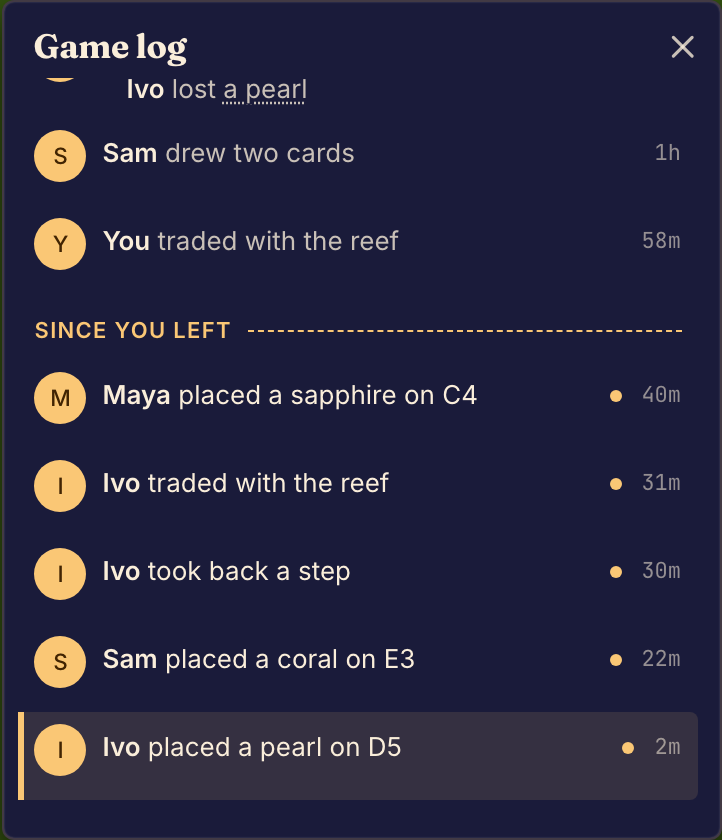
<History style? kindStyles? renderLink? /> draws the match's log with Boardweaver's own log component: style is a CSSProperties without display and flexDirection over the list, kindStyles a Record<string, CSSProperties> over each line by its kind, and renderLink(link: LinkPart): ReactNode draws a link's content in place of its parts. How it behaves: The log in the game.
type HistoryItemStep = { index: number; lines: FormattedLine[]; endsLogRow: boolean; position: number | null };
type HistoryItem =
  | { kind: "opening"; historyId: HistoryId; lines: FormattedLine[]; position: number | null }
  | { kind: "decision"; historyId: HistoryId; actorPlayerId: PlayerId | null; createdAt: Timestamp; steps: HistoryItemStep[] }
  | { kind: "undo"; historyId: HistoryId; actorPlayerId: PlayerId | null; createdAt: Timestamp; undoes: UndoneStep; position: number | null };
lineText(line: FormattedLine): string is a log line's parts as one string, with each player's name and each link's text: "Ana plays the Fireball".
apiVersion is the module's version, "4.3.0". Within a major version the module only grows: a later version adds hooks and fields and never removes them.
Moving pieces
<MoveArea>, <Movable> and <MoveTarget> let the player move a piece in two ways: click it and then click its target, or drag it onto its target. They also animate every piece the game logic moves. The game logic's offers are the only rules: prefer these components to drag and drop or move animation code of your own, and never decide in the client where a piece may go.
import { MoveArea, Movable, MoveTarget } from "boardweaver/react";

<MoveArea>
  <MoveTarget spaceId="hand-2">
    {opponentHand.map((_, index) => (
      <Movable key={index} spaceId="hand-2" index={index}>
        <CardBack />
      </Movable>
    ))}
  </MoveTarget>
  {hand.map((card, index) => (
    <Movable key={index} spaceId="hand-1" index={index}>
      {({ picked, overlay, overTarget }) => <Card card={card} raised={picked || overlay} ready={overTarget} />}
    </Movable>
  ))}
  {slots.map((slot) => (
    <MoveTarget key={slot.spaceId} spaceId={slot.spaceId}>
      {({ isTarget, isOver, dragging }) => <Slot slot={slot} lit={isTarget} hovered={isOver} dashed={dragging} />}
    </MoveTarget>
  ))}
  <MoveTarget spaceId="orbital-1s" index={0}>
    <Movable spaceId="orbital-1s" index={0}>
      <Electron />
    </Movable>
  </MoveTarget>
</MoveArea>
| Component | Props | Does |
|---|---|---|
MoveArea |
children, animate?, moveDuration? |
Put it once around the whole board, every Movable and every MoveTarget. It animates moves unless animate={false}. The moves fly one at a time, each for moveDuration milliseconds at 1x, 450 by default. |
Movable |
spaceId, index, children, className?, style?, highlight? |
A piece at spaceId and index on useBoard(). Wrap every piece in one, also pieces the player never moves, such as an opponent's, so their moves animate. The player can pick it up while its PieceClick is offered: a click takes that step, and a second click takes it back. A drag takes it when the drag starts. A piece whose PieceClick ends the decision (confirm) can be clicked but not dragged. Inside a MoveTarget with its own spaceId and index, a click on it is that target's click, taken once. |
MoveTarget |
spaceId, index?, children, className?, style?, highlight? |
A space, or with index a piece, such as an electron a card is played onto. A click on it, or a drop on it, takes its SpaceClick or PieceClick when it is offered. A drop anywhere else takes the picked-up piece back. Wrap a space whose pieces are hidden, such as an opponent's hand or a deck, in one too, so a piece flies to it or from it. |
children is the element's own look, or a function of its state:
| State | Field | True when |
|---|---|---|
MovableState |
canMove |
The player may pick the piece up now. |
picked |
The piece is picked up: the open decision's last step is its PieceClick. |
|
dragging |
The player is dragging the piece. | |
overlay |
This is the copy that follows the pointer during a drag, or that flies during a move, not the piece in its place. | |
overTarget |
The dragged copy is over an offered target, so a drop now takes the move. | |
MoveTargetState |
offered |
The game offers this target's click now. |
isTarget |
A piece is picked up or dragged, and this target is offered for it. | |
isOver |
A dragged piece is over this target. | |
dragging |
A piece is being dragged, not picked up by a click. |
By default Boardweaver draws an outline on a picked piece, a dashed outline on every offered target while a piece is picked up, and a solid outline and tint on the target under a dragged piece. The dragged copy is raised a little with a shadow, and outlined while it is over a target. The piece in its place is faded while it is dragged. Pass highlight={false} to draw all of this yourself from the state. Each component renders one div, which is the piece's or the target's box: give it its size with className or style, or in CSS with [data-piece] (every Movable) and [data-move-target] (every MoveTarget), and draw the piece to fill it. The dragged copy and a flying copy are drawn at that box's size. The div also sets data-movable, data-picked, data-dragging, data-target and data-over while each state is true, for styling a state, never a size. A drag starts only after the pointer moves a few pixels, so a click never becomes a drag. Draw a Command offer, such as Pass or Confirm, as a button.
Every piece the game logic moves flies from its old place to its new one, drawn with its Movable look (with overlay true): another player's steps, and Back and Forward in replay. The piece the player dragged does not fly, since it is already where it was dropped, but every other piece the same step moves does. A move the player makes by clicking a piece and then a MoveTarget always flies, at the playback speed, from the piece to the target, even when the game logic records no move, such as a card that stays in the hand while a copy of it is planned on a slot: the copy lands on the Movable that appeared inside the target with that step, hidden until it lands, or fades out over the target when none did. The moves fly one at a time, in the order the game logic made them, so the player can follow each one: each copy waits in the piece's old place until the move before it lands, and the board waits until the last one lands. The piece in its new place is hidden until the copy lands. A move flies only when the game logic records it as a move (move_piece or move_piece_to, Changing the state) and both places are drawn with a Movable, or one of them with a MoveTarget for a hidden space. A piece flying to or from a hidden space keeps its own size, centered on the space, and is drawn as it looked before the move. A piece moved from one hidden space to another, such as a card drawn into an opponent's hand, does not fly, since neither place shows it. Boardweaver skips the flight while the player prefers reduced motion, and on a reconnect, a seek or a skip to now. A change that is not a piece moving, such as damage or a score, is not animated: animate it yourself (Optional animation helpers). To show it in its place in the sequence, start it after the moves before it: inside MoveArea, useTransitionOverlays() gives each flying move's delay, and each move flies for moveDuration.
Types
Import any of these with import type { ... } from "boardweaver/react".
The board: State, Player, Space, Piece, Arrangement, PlayerId, Score, Scores.
type State = { activePlayerIds: number[]; players: Player[]; spaces: Space[]; metaData?: Record<string, unknown> };
type Player = { playerId: number; bot?: string | null; publicState?: Record<string, unknown>; privateState?: Record<string, unknown> };
type Space = { spaceId: string; kind: string; owner?: number | null; arrangement?: "ordered" | "collection"; pieces?: Piece[]; publicState?: Record<string, unknown>; privateState?: Record<string, unknown> };
type Piece = { publicKind: string; privateKind?: string | null; owner?: number | null; publicState?: Record<string, unknown>; privateState?: Record<string, unknown> };
Moves: Action, Offer, Intent, Input, InputValue, Outcome.
type Action =
  | { type: "SpaceClick"; spaceId: string }
  | { type: "PieceClick"; spaceId: string; index: number }
  | { type: "Command"; name: string; value?: string | number | null };
type Offer = { action: Action; intent: "choice" | "confirm" | "cancel"; label?: Message | null; input?: Input | null; reveals?: boolean };
type Input = { type: "Text"; maxLen: number; suggestions: string[] } | { type: "Integer"; min: number; max: number; step?: number | null };
Outcome from act and undo is { id, type: "applied" }, { id, type: "sent" }, { id, type: "undone" } or { id, type: "failed", reason: FailureReason, applied? }, where applied counts the steps of a list that joined before one failed. The type also has committed and deferred, which act and undo never answer.
Changes: LastChange, Direction, PlaybackStatus, PlaybackView, PlaybackSpeed, WasmStepView ({ actorPlayerId?; intent?; lines: FormattedLine[]; movements: ViewedMovement[] }), FormattedLine, LinePart, PlayerPart, LinkPart, WasmLastUndo, ViewedMovement, Spot.
type FormattedLine = { playerId: number | null; kind: string | null; parts: LinePart[] };
type LinePart = string | PlayerPart | LinkPart;
type PlayerPart = { playerId: number; name: string };
type LinkPart = { key: string; parts: LinePart[] };
type Spot = { type: "At"; spaceId: string; index: number } | { type: "Hidden"; spaceId: string };
type ViewedMovement =
  | { type: "Moved"; from: Spot; to: Spot; piece: Piece }
  | { type: "Added"; at: Spot; piece: Piece }
  | { type: "Removed"; from: Spot; piece: Piece }
  | { type: "Flipped"; at: Spot; piece: Piece }
  | { type: "Shuffled"; spaceId: string };
Animation: BoardTransition, PieceTransition, TransitionEndpoint, TransitionOutcome, TransitionReason, AnimationRun, AnimationEffect, AnimationRectangle, AnimationOverlay, AnimationAnchor, AnimationElement, TransitionProviderProps.
Drafts and failures: DraftView, DraftStepView, PendingView, PendingKind, UndoAvailable, UndoneStep, CoreFailure, FailureReason, Refusal, Unresolved, AbandonedStep, AbandonReason, HistoryId, Timestamp.
FailureReason.code is one of:
| Code | Means |
|---|---|
NOT_PLAYING |
This client is a spectator, or the match takes no moves. |
LOADING |
The match has not loaded yet. |
WAITING |
Another decision or undo is on its way. |
STALE |
The step was made on a board the player no longer sees. |
PLAYING |
The board shows an earlier step. Boardweaver offers to return to now; see Other players' steps. |
UNPREDICTABLE |
The step cannot show before Boardweaver applies it. |
DRAFT_FULL |
The decision already has 200 steps. |
NO_STEPS |
act got an empty list. |
NOTHING_TO_UNDO |
Undo has nothing to take back. |
REFUSED |
The game logic refused the step. refusal says how. |
MODULE_FAILED |
The game logic failed while showing the step. message says how. |
SERVER_REFUSED |
Boardweaver refused the decision. Carries status, message, the dropped steps and maybe a refusal. |
NOT_APPLIED |
The decision was not applied. Carries the dropped steps. |
DRAFT_DROPPED |
Draft steps no longer fit the board and were dropped. Carries the dropped steps and maybe the refusal of the first one. |
DRAFT_LOAD_FAILED |
The saved draft did not load. Carries status and message. |
Refusal.refused is NOT_OFFERED, INPUT_DOES_NOT_FIT, GAME (with the game logic's reason, a Message), NEEDS_SERVER, ENDS_DECISION, DECISION_OPEN or UNRESOLVED (with a reason of GONE, NO_SUCH_PIECE or NO_SUCH_SPACE).
Messages: Message ({ key: string; args?: Record<string, Arg> }) and Arg ({ player } | { message } | { link: { key, text } } | { number } | { text }), the text the game logic writes, which useMessageText() writes out.
Hook results: MatchInfo, SelfState, UndoControl, Pending, Failures, Playback, MatchEnd.
Platform: PlaybackOptions, HistoryOptions, HistoryControl, HistoryItem, HistoryItemStep, HistoryProps, LogLinkEvent, PlayerProfile, MatchStatus, ColorMode, GameTheme, Viewport, Sounds, SoundType, PlaySoundOptions, SoundHandle, AudioSettings.